Blog Archive

Nuestros Post

En Soluciones Rubarb Te mantenemos al tanto de las novedades tecnológicas día a día.

A continuación enumeramos algunas de nuestras fuentes:

Softonic

Bitelia

Mi Blackberry

Blackberry Latino

Centro Blackberry

La Blackberry

Techtastico

Con la tecnología de Blogger.
Mostrando entradas con la etiqueta Ipad. Mostrar todas las entradas
lunes, 13 de agosto de 2012

Cómo transferir fotos entre iPhone y la PC vía Wi-Fi

Si tienes un dispositivo con iOS, debes saber muy bien que para transferir cualquier cosa necesitas usar iTunes. Este programa siempre me ha parecido pesado y torpe, y a pesar de que ha mejorado con el paso del tiempo, sigue siendo así. Por otro lado, si eres usuario de Linux no puedes instalar esta aplicación, tienes que usar algunas de terceros, o evitarlo por completo.

Para solucionar esto podemos usar MultiLoader, una aplicación gratis para iPhone que te permite conectarte entre el teléfono de Apple y una computadora, y mandar todas las imágenes que quieras de uno al otro, solo conectándose a través de una misma red Wi-Fi.

Su uso es extremadamente simple. Comienza por instalar la aplicación desde la App Store. Al abrirla conseguir la sección “Receive From” y presiona “PC”.

Se te entregará un enlace que deberás abrir en tu navegador preferido y desde ahí tendrás un botón para examinar y subir las imágenes. Solo se conectará cumpliendo la condición de que ambos estén en el mismo Wi-Fi. La interfaz del navegador solo te permitirá subir una imagen a la vez pero se puede subir un ZIP para que sea más rápido. Luego puedes descomprimir en el iPhone.

Si presionas “Receive From iPhone” el proceso será al revés, del iPhone a la PC. Adicionalmente la aplicación también tiene la opción “Send To” donde también podrás enviar las fotografías a Facebook, Twitter, Tumblr, Picasa, Dropbox, correo electrónico y más. Así que tendremos para compartir en redes sociales, algo que es casi indispensable en cualquier aplicación nueva.

Instala MultiLoader [Vía]

domingo, 29 de julio de 2012

Las Olimpiadas 2012 en tu móvil

london2012

El espectáculo deportivo más grande del mundo ha vuelto. Si quieres disfrutar al máximo de las Olimpiadas 2012 de Londres, te presentamos las mejores aplicaciones móviles para Android, iPhone, BlackBerry, Symbian y Windows Phone para no perderte nada.

Calendarios, resultados, noticias y hasta el juego oficial son algunas de las novedades que inundan estos días las tiendas de aplicaciones. Prepárate para vivir el espíritu olímpico.

Aplicaciones oficiales

London 2012 Join In App

Aplicación oficial de la organización de los Juegos, con información práctica sobre eventos, estadios y lugares de interés en Londres. Pensada para los que tengáis la posibilidad de vivir los Juegos desde Londres.

Android - iPhone - BlackBerry

Results Official London 2012 App

La segunda aplicación oficial de Londres 2012, con todos los horarios, resultados y noticias de las Olimpiadas. Muy completa, puedes personalizarla según tu nacionalidad y elegir tus competiciones preferidas.

Android - iPhone Windows Phone

Noticias y resultados

MARCA.com

Uno de los diarios deportivos en español de referencia. Su aplicación oficial incluye un apartado dedicado exclusivamente a los Juegos Olímpicos de Londres. Una buena opción si buscas aplicaciones que no caduquen.

Android - iPhone - Symbian - Windows Phone

Eurosport.com

Eurosport es otra de las firmas de referencia en el mundo del deporte. Las noticias de su canal de televisión vienen recogidas en la aplicación. Una de las mejores aplicaciones si quieres seguir la actualidad polideportiva.

Android - iPhone

ESPN ScoreCenter

ESPN es uno de los líderes en información deportiva en el continente americano. Con su aplicación móvil podrás estar a la última en cuanto a resultados de cualquier evento deportivo. Todo con la firma de ESPN.

Android - iPhone

AS.com

Si eres lector del diario AS y quieres disfrutar de sus contenidos en tu móvil o tablet, ésta es tu opción. Actualidad del fútbol y el resto de deportes, que también cubre el desarrollo de los Juegos de Londres.

Android - iPhone - Windows Phone

Vídeos y televisión

YouTube

Si quieres ver resúmenes  y vídeos oficiales de la competición, YouTube es siempre una buena opción. Desde su app para móviles podrás disfrutar de los contenidos del canal oficial de Londres 2012.

Android - Symbian - Windows Phone

SopCast

SopCast lleva años permitiendo ver eventos deportivos en directo a través de Internet. Con su app para Android podrás conectarte a los Juegos y verlos directamente en la pantalla de tu móvil o tablet.

Descarga Android

Para ir a Londres

London City Guide

De mano de TripAdvisor, esta guía es una de las mejores alternativas para disfrutar durante tu estancia en Londres. Mapas, información de lugares turísticos y las críticas y opiniones de otros viajeros te guiarán si visitas Lomdres durante los Juegos.

Descarga Android

London Underground

Uno de los mejores sistemas de metro del mundo puede ser una pesadilla si no lo conoces. Con London Underground sabrás siempre dónde estás y cómo ir a cualquiera de los eventos de las Olimpiadas.

Descarga Android

El juego oficial

London 2012- Juego oficial

Si lo que te gustan son los juegos, con el juego oficial de Londres 2012 tú serás el protagonista. Elige entre varias especialidades olímpicas, compite con jugadores de todo el mundo y alcanza el pódium y la medalla para tu país.

Android - iPhone

Las Olimpiadas de Londres se celebran entre el 27 de julio y el 12 de agosto de 2012. La competencia es dura, las aplicaciones también... ¿qué aplicación se llevará la medalla de oro?

Fuente http://onsoftware.softonic.com

jueves, 19 de julio de 2012

An iPad Lover’s Take On The Nexus 7

photo 1

Trolls, feel free to skip to the bottom of this column and post your comments immediately without reading a word. Actually, who are we kidding — you didn’t make it this far.

Everyone else, brace yourselves. You may want small children to leave the room. I’m about to do something I don’t do often — something I always said I’d do if the product deserved it. Something some people seem to think I’m incapable of: praise a Google product — an Android-based Google product, no less.

Is that enough build up for you? Okay.

I like the Nexus 7. I really like it.

I was out of town during Google I/O this year and missed the opportunity to see the unveiling and get my hands on the product a few weeks back. But Google was kind enough to give me a Nexus 7 demo unit last week. I’ve given the company credit for this before. For the most part, they don’t mind criticism and genuinely seem to want to build products that all consumers (whether Apple fans or not) will like. And with the Nexus 7, I think they’ve done just that.

To be clear, the product isn’t perfect. But no product is. Yes, that includes Apple products (though the MacBook Air in the pre-retina world was pretty damn close, in my opinion). But with the Nexus 7, Google has, for the first time, created an Android product that I would buy for myself. And I wouldn’t have an issue recommending it to anyone else.

Everyone already knows the device’s two key features: the 7-inch screen and the $199 price. Both have been rumored for months. And I was highly skeptical of both. I love my iPad from the screen size on down. And I didn’t think it would be possible to build a great tablet at such a low price.

But I was wrong.

Granted, Google isn’t making any money selling the device at $199 — at least not directly. And the device isn’t quite iPad-quality. But the iPad starts at $499. This is less than half the price. And the build quality is very good.

Normally when I get a review unit of a non-Apple product, I have to force myself to use it to get a sense of how I might use it in the real world. But with the Nexus 7, I actually find myself wanting to use it. That point can’t be overstated. I actually want to use an Android device. It’s a brave new world.

For me, the key is the size. Again, I was skeptical at first, but for many situations, I’ve come to love the 7-inch frame. The iPad is brilliant when you’re sitting on a couch or camped out in a coffee shop. In my view, the 9.7-inch iPad is slowly but surely becoming a laptop replacement. I expect this to continue. But a 7-inch tablet is different. The iPad is clunky to read in bed, for example. The Nexus 7 is perfect for that.

More broadly, the 7-inch tablet further opens the door to true mobile computing. I find myself constantly using it while walking around the house (as opposed to sitting on the couch). And I don’t think twice about shoving it in my bag when I take off for the day (as I sometimes do with my iPad when I have my laptop with me). Many could say the same about the iPad, but in my view, the 7-inch tablet is more desirable in many circumstances simply because it’s — shocker — smaller. 9.7 inches versus 7 inches may not seem like a huge difference. But it is.

Whereas laptop sizes vary mainly to please screen size preference, I suspect that 7-inch tablets will fit naturally into different use cases than 10-inch tablets. In other words, I believe they’ll end up being closer to two different categories rather than two variations of the same category.

Having used a 7-inch tablet for the past week, I now see it as an absolute no-brainer that Apple has to make an iPad with this form factor as well. Of course, such rumors have been swirling for a while — and now the smoke seems too thick for there not to be a fire. It’s coming — but when it does, Apple will find itself in a position it hasn’t been in for some time: being a second-mover to a good product already on the market (as opposed to being a second-mover to a bunch of mediocre-to-shitty products, as has been the case many times in the past).

Back to the Nexus 7 (sorry, this is an “Apple column” remember). For now, its true competitor is the Kindle Fire. But calling the Kindle Fire a “competitor” is probably being too kind to Amazon. All I know is that Amazon better hope their next version of the device is ready to go ASAP and that it’s significantly better than the first version. Because the Nexus 7 seems far better in pretty much every way.

Loaded with Android 4.1 “Jelly Bean”, the Nexus 7 is as fast as advertised. I do spot some lag from time to time (the swiping between main screens could still be smoother when a live wallpaper is running, but that’s a minor thing most regular users probably won’t notice), but it’s almost always within apps which don’t seem custom-tailored for the new OS yet. A good example is the Facebook app. iOS users constantly complain about this app being slow and unreliable — on Android, it’s much worse. That includes on the Nexus 7.

With the Google-built apps, Jelly Bean runs great. Overall, the OS doesn’t seem all that different from Android 4.0 “Ice Cream Sandwich”, but it’s more refined. I imagine it’s similar to what we’ll see with iOS 6 versus iOS 5. These mobile OSes are getting mature enough now where it’s more about refinement. For a long time, Android needed far more than polish. Now it’s at that stage.

Gaming had been one problematic area in the past for Android. With the Nexus 7 and Jelly Bean, it’s solid. I played several games that I play on iOS devices to compare — games like Canabalt, Osmos, Sky Safari, Angry Birds, World of Goo, Flick Golf, and Fruit Ninja. All now seem to run just as well as they do on iOS devices.

While the Nexus 7 has access to apps like Flipboard (and it runs great on the device, though without access to New York Times content, oddly), other apps like Instagram and Tumblr can’t be installed because they say the device isn’t supported. I’m told this is due to code in those apps which puts a “ceiling” on the Android version number on which they can be installed, and this should be fixed soon.

This brings up another important issue: because this is a Nexus device that Google built in conjunction with Asus, it should be fairly future-proof for future versions of Android and apps that require the more advanced APIs they provide. While previous Nexus devices still had issues getting timely updates, the Nexus 7 is WiFi-only, meaning the carriers have absolutely no say when it comes to updates here. In other words, goodbye bottlenecks.

But this is a double-edged sword. One of my favorite aspects of the new iPad is the 4G connectivity both because it’s really, really fast and because it works basically everywhere. With the Nexus 7, you have to rely on a WiFi connection. Again, while that’s great news for future updates, it’s bad news for true road warriors. (It also makes Google Now, the tentpole new feature of Jelly Bean, less useful because it can’t constantly send you new information based on your location.) Still, given Google’s difficulties in dealing with the carriers in the past, I think this was the right call.

As you might imagine, the lack of cellular radio also seems to help the battery life of the device quite a bit. It’s fantastic.

Another nit I have with the 7 involves the software system buttons. A number of times while playing a game in horizontal mode, I would inadvertently activate the buttons and hit one of them. The issue is that because the screen is so small, it’s a bit awkward to use with two hands. Likewise, in portrait mode, there isn’t much of a bezel to grip. It’s easy enough to hold with one hand, but for an iPad user (which features a much larger bezel), this took some getting used to.

When you first boot up the Nexus 7, you’ll notice that Google has given prominent position to Google Play media items. In fact, that entire main screen is dominated by a rather ridiculously large “My Library” widget (which I quickly replaced with my favorite apps instead). This is a weird choice because one area of weakness for the device is the media catalog. The Google Play store still doesn’t have access to any Warner music, for example. And the film, television, magazine, and book libraries are smaller than those that Apple and Amazon offer. I suppose this was a decision made to go right after the Kindle Fire (a “media tablet”), but again, Amazon still wins that battle. It’s not a huge deal, just an odd choice, in my opinion.

Now I’m back to focusing on the negative — old habits die hard, sorry. Again, the fact remains that the Nexus 7 is a great device. Not a great device graded on some weird curve where we pretend that Apple products don’t exist — but a great device, period. The $199 price point is just icing on the cake.

If you’re an iOS person like myself, you obviously have to think about Apple moving into this space as well. And I think the Nexus 7 shows a few places where Apple can improve the 7-inch tablet space — namely in making a device just a bit larger so it’s easier to hold with two hands, and using their existing pay-as-you-go carrier deals to offer up 3G/4G connectivity. We’ll see.

But for now, Apple’s not in this space. And the clear winner in this space is the Nexus 7.

Source http://techcrunch.com

miércoles, 30 de noviembre de 2011

Todo lo que necesitas saber sobre los códigos QR

¿Qué son esos recuadros negros que parecen códigos de barras cuadrados? ¿Sirven para algo? ¿Cómo puedo interpretarlos? Si todavía no sabes que son "esos extraños recuadros negros" que puedes ver en cualquier sitio, desde revistas hasta latas de refrescos, en este artículo te explicamos todo lo que necesitas saber sobre los cada vez más populares códigos QR.

¿Qué son los códigos QR?

Básicamente, los códigos QR (Quick Response Barcode) es una evolución del popular código de barras. Un estándar que permite representar en un gráfico bidimensional más de 4000 caracteres alfanuméricos.

¿Para qué se usan?

Inicialmente, los códigos QR lo utilizaban los fabricantes de automóviles para la administración y el control de inventarios. Actualmente, son muchos los sectores que lo utilizan para compartir información de una manera visual: empresas IT, desarrolladores de software, agencias de publicidad, prensa, entre otros.

¿Cómo se leen?

Para leer o interpretar un código QR es necesario un dispositivo con cámara de fotos y un lector compatible.  Antes, estos requisitos eran un inconveniente importante. Sólo las empresas podían disponer de lectores diseñados exclusivamente para esto.

Pero ahora, gracias a la nueva generación de teléfonos móviles, gran parte de la población cumple con los requisitos. De ahí que, en los últimos meses, su popularidad haya crecido exponencialmente.

¿Cómo se crean?

Crear un código QR es muy sencillo. Únicamente necesitas un generador de códigos QR. Existen aplicaciones para Windows, Linux y Mac; pero lo más rápido y sencillo es utilizar servicios en línea como los ofrecidos por Kaywa, MSkyNet o invx. Basta con seleccionar el tipo de información que vas a introducir (por ejemplo, URL), introducir el texto y pulsar generar. Así de simple.

¿Qué programa utilizo para leer códigos QR?

Actualmente, en Internet puedes encontrar decenas de lectores capaces de leer e interpretar estos códigos. Todo depende del sistema operativo de tu teléfono móvil y poco más.

Pero como el tiempo es oro, a continuación te recomendamos los lectores de códigos QR más relevantes para Android, iPhone, Symbian, BlackBerry y Windows Mobile.

Lector de códigos QR para Android: Barcode Scanner

Barcode Scanner es un lector de códigos QR polivalente. Además de leer e interpretar este estándar, el programa es capaz de capturar otros formatos de códigos de barra y lanzar búsquedas de referencias en Internet.

Lector de códigos QR para iPhone: i-nigma

Con ayuda de i-nigma y la cámara de tu iPhone serás capaz de averiguar todo lo que se esconde tras un código QR. Además, soporta otros códigos de barra como DataMatrix. Sus funciones adicionales lo convierten en el programa ideal para compartir códigos con otros usuarios.

Lector de códigos QR para Symbian: Barcode Reader

Barcode Reader es una utilidad que te permitirá utilizar la cámara preinstalada en tu teléfono móvil para leer códigos QR, BIDI o DataMatrix. Desde las opciones de Barcode Reader es posible guardar los datos de los códigos QR en una librería, enviar códigos por SMS, correo o Bluetooth.

Lector de códigos QR para BlackBerry: Beetagg

Si tienes una BlackBerry, tu lector de códigos QR se llama Beetagg, una utilidad que te permitirá leer e interpretar códigos QR utilizando la cámara disponible por defecto en tu dispositivo. Es compatible con otros formatos como DataMatrix o BeeTagg Code.

Lector de códigos QR para Windows Mobile: i-nigma

Sí, i-nigma repite. Al igual que su versión para iPhone, i-nigma para Windows Mobile es una de las mejores soluciones que podrás encontrar para leer códigos QR con tu dispositivo. Es muy fácil de utilizar, soporta tanto códigos QR como DataMatrix y permite compartir códigos con otros usuarios.

¿Y ahora qué?

Una vez instalado el lector en tu teléfono móvil es la hora de pasar a la acción. A continuación te listamos tres ejemplos de códigos QR para que practiques y descubras, por ti mismo, las infinitas posibilidades que esta nueva manera de representar información ofrece.

       
Leer un mensaje oculto

           Representar una URL

         Descargar un program

Fuente http://onsoftware.softonic.com/

martes, 16 de noviembre de 2010

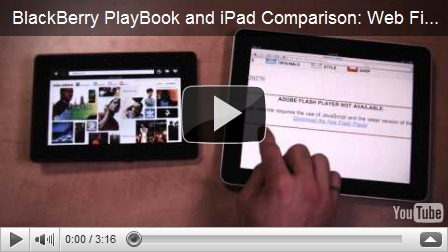
Vídeo; BlackBerry PlayBook vs Apple iPad (navegadores y recursos web)

Parece que las palabras de Steve Jobs, CEO de Apple, no sentaron nada bien en el cuartel general de Rim. Recordamos brevemente que Steve Jobs comentó en su día que la pantalla de la BlackBerry PlayBook no era lo suficientemente grande como para tener una experiencia web agradable. Entonces Rim se limitó a contestar a través de un comunicado oficial argumentando que el tamaño de la pantalla del PlayBook era simplemente la idónea para navegar y disfrutar de un tablet de alta categoría.

Ahora Rim nos sorprende ya que ha publicado un vídeo donde enfrenta los dos grandes tablets por excelencia, el iPad, líder de ventas indiscutible y el BlackBerry PlayBook que saldrá al mercado el próximo año pero que ya está deleitando a todos los geeks.

El vídeo demuestra que hoy por hoy el BlackBerry PlayBook es más potente, al menos en lo que a su navegador se refiere, el soporte flash es algo indispensable hoy día y el iPad no tiene, así que claramente el PlayBook sale ganador… aunque ya hay voces que el nuevo dispositivo de Rim debería medirse con el iPad 2 que probablemente verá la luz al mismo tiempo que el PlayBook… entonces quizá habrá que hacer otro vídeo.

Blog Archive